Minifig Scan
- 4.8
- Rating
- 1.00M
- Installs
- Free
- Price

 Analysis by App-foxy
I like small, focused shopping tools, and Minifig Scan fits that description unusually well. It is built for one very specific problem: identifying which small figurine is hidden inside a boxed product by scanning its data code. That sounds narrow, but it can save a surprising amount of time when you are choosing between several sealed boxes and want a particular character rather than another duplicate.
In my experience, the appeal is not that it replaces a full shopping app. It does something much more practical for collectors: it turns a vague guess into a quick check before buying. The app is free to download, comes from PacoLabs, and sits in the Shopping category. Its store summary is brief, but the real value becomes clearer in everyday use: it helps you make a more informed choice at the shelf instead of relying on luck, shaking boxes, or asking other shoppers.
How Minifig Scan feels during real shopping
I find the most useful way to judge Minifig Scan is to focus on the moment it handles: choosing among sealed boxes before paying, when a quick scan can matter more than a broad set of shopping tools. I’ll also look at what a careful shopper can assess about trust and choice without assuming anything about permissions or data practices. That leads naturally to the practical question of what the app lets you control.
You May Also Like

 Blood Strike: 2.5 Anniversary
Blood Strike’s Loadouts Turn Every Drop Into a Tactical Gamble
A close look at Blood Strike’s custom loadouts: how fast access to signature weapons reshapes its battle royale rhythm, rewards preparation, and narrows the gap between fights.

 Pandora - Music & Podcasts
Pandora’s Music Is Easy to Start, but Harder to Recover
Pandora’s strength is its low-effort path from a seed to a station. Its weak spot is how much confidence it asks you to place in connection, setup, and quiet recovery.

 8 Ball Pool
 Is Built on Rivalries, Rematches, and Routine
A close look at the rivalries, rematches, shared routines, and unanswered safety questions that turn a quick pool match into a persistent mobile community.

 Samsung Music
’s Quiet Strength Is Playing What You Already Own
Its reach comes less from spectacle than from dependable access to a personal library. That simplicity is both the app’s strongest retention engine and its ceiling.

 AccuWeather: Weather Radar
AccuWeather Review: A Quick, Clear Forecast for Everyday Decisions
For everyday plans, the best forecast is the one you can understand quickly. AccuWeather makes rain timing, radar, and local conditions easy to act on, with a few trade-offs.

 Hill Climb Racing
Why Hill Climb Racing Still Turns Crashes Into One More Run
A tiny car, a bumpy hill and one more upgrade: Hill Climb Racing keeps resurfacing because its simple chaos makes every near-miss feel personal.
More From Our News Desk



Fast decisions are the main reason to use it
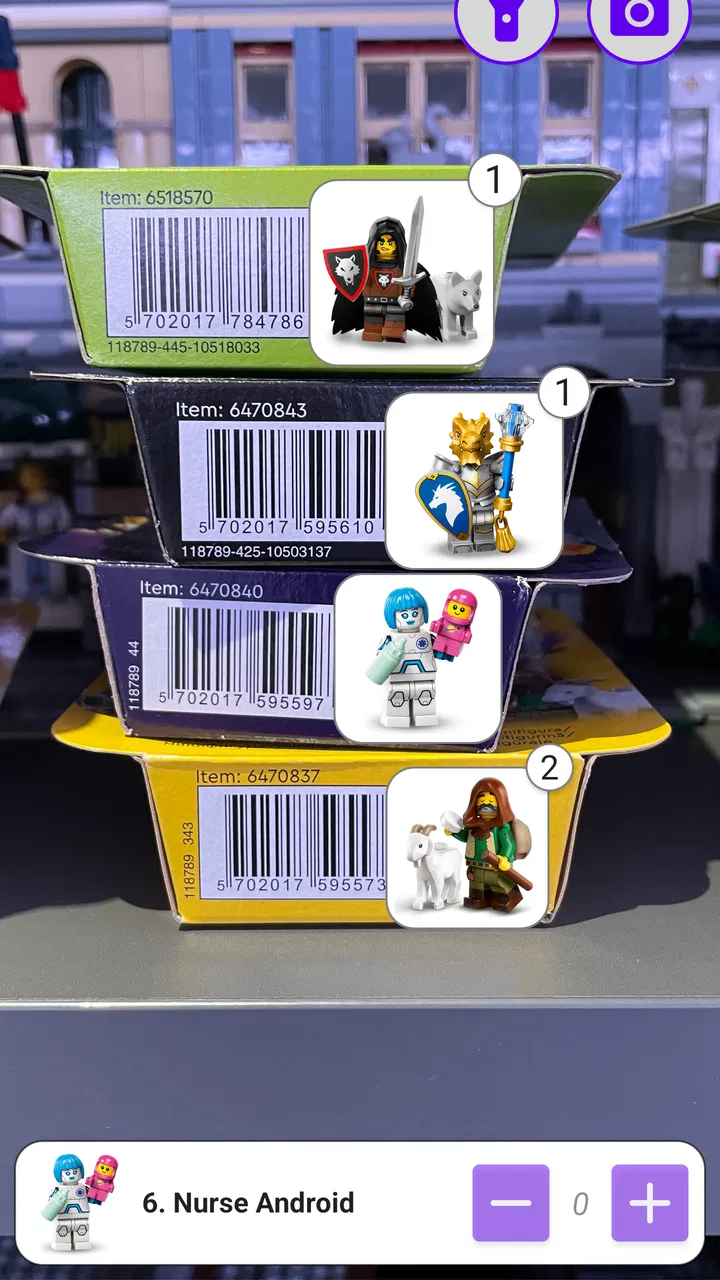
The first thing I noticed is that the usefulness of this app depends on keeping the workflow simple. You are not opening it to browse a large catalog or compare complicated product specifications. You open it when a sealed box is in front of you, point the phone at the relevant code, and look for an identification result. That focused purpose makes the experience feel quicker than using a general visual-search tool or manually searching online.
Speed matters most in a shop. If I am standing in an aisle with several boxes in my hand, I do not want to type a long product name, inspect tiny packaging details, and scroll through image results. A dedicated scanner has a much clearer advantage: it is designed around the code itself. The best habit is to prepare the phone before picking up the box, keep the camera steady, and scan in consistent lighting rather than trying to rush through several boxes at once.
There is also a useful psychological benefit. Without a scanner, collectors often make decisions based on packaging weight, sound, or the position of an item inside the box. Those tricks can be entertaining, but they are not a dependable identification method. Minifig Scan gives me a more disciplined workflow: scan first, then decide whether the item is worth buying. The app is most valuable before the purchase, not after opening the box.
That distinction is important for expectations. It is not a general-purpose barcode comparison service for every product in a shopping basket. Its appeal comes from the specific relationship between a data code and the small figurine associated with that code. If you want a broad shopping assistant, a retailer app or ordinary barcode scanner will usually be more versatile. If you want to identify a boxed minifigure quickly, a specialized tool is the more sensible choice.
What affects the perceived speed
A scan can feel instant when the camera has a clear view and the code is easy to read. It can feel much slower when the box is glossy, the print is partly hidden, or the phone keeps trying to focus. That is not necessarily a weakness in the app itself, but it changes how the product feels in practice. I get better results by holding the box flat, avoiding reflections, and moving the phone slightly instead of pressing it close to the packaging.
For repeated scans, I would avoid waving the phone across a pile of boxes. A deliberate rhythm works better: position one box, wait for the code to settle, confirm the result, then move to the next. This reduces accidental scans and makes it easier to remember which identified figure belongs to which box. It also keeps the process calmer when several people are shopping nearby.
The app’s current version is 3.5.4, and that gives me some confidence that the developer is maintaining a mature product rather than leaving a one-off experiment untouched. Still, version information alone cannot promise that every scan will be perfect. Packaging condition, camera focus, and the exact code being scanned remain part of the experience.
What happens during a heavy scanning session
The most demanding situation is not a single scan. It is a collector checking a whole display, comparing duplicates, and repeating the process for several minutes. In that situation, the practical strain comes from the phone’s camera activity and from the user constantly repositioning boxes. I would treat it as a short-burst tool rather than something to leave running throughout an entire shopping trip.
A simple workflow helps. I would first decide which figures I am trying to find, then scan only enough boxes to make a purchase decision. There is little benefit in recording every possible result if the goal is simply to avoid duplicates. For a larger search, I would keep a short note on the phone or in my head and separate already checked boxes from unchecked ones. That prevents the common mistake of scanning the same packaging twice.
Another useful approach is to scan in a quiet corner of the shop if the display is crowded. The app may be quick, but the human part of the process still needs space. Rushing while holding multiple boxes increases the chance of dropping one, losing track of the results, or accepting an identification without checking that the code was actually visible.
I would also avoid judging the app by a difficult first attempt. If the phone struggles with glare, clean the camera lens, change the angle, and move under more even light. Those steps are more useful than repeatedly tapping the screen. A scanner cannot compensate for a code that the camera cannot clearly see.
Reliability depends on the whole scanning chain
Reliability is where I would keep my expectations realistic. The app can identify a figurine from a readable data code, but that does not mean every box will be equally easy to scan. Creased cardboard, damaged printing, reflections, poor lighting, and an incorrectly framed code can all make the result less dependable. In other words, the app is a strong aid for verification, not a reason to stop looking at the packaging.
My preferred habit is to confirm the scan visually before putting the box in the basket. If the result appears immediately and the code was clearly in view, I feel comfortable using it as a buying guide. If the scan was awkward or the phone caught only part of the code, I would try again rather than treating the first result as final. That extra second is worthwhile when the purpose is to avoid a duplicate.
Recovery is also part of reliability. When a scan does not work, the sensible response is to reset the setup rather than repeatedly forcing the same attempt: pull the phone back, change the angle, steady the box, and check the lighting. If the problem is the packaging itself, another box may be a better test than spending several minutes on one difficult surface.
I appreciate that this kind of limitation is easy to understand. A general image-recognition app might appear more flexible, but it can also produce less focused results and require more interpretation. Minifig Scan has a narrower job, which makes a successful identification easier to act on. The trade-off is that it is less useful outside that job.
Device requirements and practical constraints
The app supports devices running Android 6.0 or later, so it is not limited to only recent phones. That broad compatibility is helpful for collectors who keep an older handset as a shopping device. The quality of the experience will still depend on the phone’s camera, focus behavior, screen visibility, and general condition. An older supported phone may run the app but make scanning less comfortable if its camera struggles with close-up packaging.
Because the task uses the camera, battery condition matters during long shopping sessions even if the app itself is focused and lightweight in purpose. I would start with a reasonably charged phone, especially if I plan to scan a complete display. A small power bank is more useful for a collector spending a long time browsing than expecting the app to solve every identification instantly.
The Everyone age rating also makes the app approachable for families and younger collectors, although an adult may still want to handle purchases and explain that a scan is a guide for choosing a box, not a guarantee about the condition of the item inside. The app’s free price makes trying it low-risk, while in-app purchases range from $1.99 to $9.99 per item. I would check which part of the experience those purchases apply to before paying, particularly if I only need occasional scans.
That pricing detail changes the recommendation slightly. Casual users can start without committing money, which is a real advantage. Frequent collectors may find paid additions worthwhile if they support their particular workflow, but someone who rarely buys boxed figurines should first see whether the free experience already covers their needs. I would not purchase anything simply because the app is specialized; I would buy only if the added value is clear in repeated use.
Where it beats ordinary alternatives
The usual alternative is to search online after opening a box, which is too late if the goal is to choose a specific figure. Another option is to compare package markings manually, but that requires patience and confidence that the markings have been interpreted correctly. Guessing by weight or sound is faster in some situations, yet it is inconsistent and can be awkward in a busy shop.
Minifig Scan has a sharper advantage because it fits the moment when the decision is being made. It does not ask me to build a spreadsheet of collection records or browse a large marketplace. It focuses on the small piece of information that matters at the shelf: which figurine is associated with this sealed box?
That specialization is also its biggest boundary. If I am shopping for ordinary household products, checking prices, managing a wish list, or comparing sellers, I would choose a full shopping app instead. If I need a visual catalog of every collectible I own, a collection-management tool may be better. This app makes sense when the code-to-figurine scan is the central task.
Who will get the most from it
I would recommend it first to collectors who dislike duplicates, parents trying to find a child’s requested character, and shoppers who regularly encounter sealed minifigure boxes. It is especially useful when the purchase is made in person and returning an opened duplicate would be inconvenient. The free entry point also makes it easy to test before deciding whether the scanning workflow fits your habits.
A realistic example is a parent stopping at a store after school. The child wants one particular figurine, but several sealed boxes are available and there is no desire to buy multiple packs. Instead of guessing, the parent can use the phone to check the boxes one by one, set aside the likely match, and make one informed purchase. That is a small task, but it is exactly the kind of situation where a narrow tool can be more useful than a feature-heavy shopping platform.
I would be less enthusiastic for someone who buys only occasionally and does not care which character appears. If surprise is part of the fun, scanning removes that element. It is also not the right choice for a collector who wants detailed inventory management, trading tools, price tracking, or broad product research. Those needs belong to other categories of apps.
My performance verdict after weighing the trade-offs
Minifig Scan succeeds because it does not try to be more complicated than the problem requires. Its perceived speed is good when the code is clearly visible, its workflow suits quick decisions, and its focused design is more practical than manual searching when I am standing in front of sealed boxes. The main friction comes from the physical scanning conditions rather than from the idea itself: glare, focus, damaged packaging, and repeated scans can slow the process.
The app’s 4.8 average from around 4.5 thousand ratings and more than 500 thousand installs suggest that the focused concept has found a substantial audience. I see why. A collector does not need a long explanation when the useful outcome is simply knowing whether a box is worth buying. PacoLabs has kept the product centered on that moment, and that clarity is its strongest quality.
My final recommendation is straightforward: try it if you regularly buy these boxed figurines and want to reduce duplicate purchases. Keep the camera lens clean, scan under even light, verify difficult results, and use a measured process when checking many boxes. Skip it if you want a complete shopping companion or if you prefer the surprise of opening an unidentified package. For its specific job, though, this is a practical little scanner rather than a generic shopping app dressed up with extra features.
With a free starting point, support for Android 6.0 and later, and an Everyone age rating, it is easy to test on a suitable phone. I would treat the optional purchases as something to evaluate only after regular use, not as a requirement for deciding whether the basic idea works. If the app can identify the codes you encounter and fits your shopping routine, it can make a frustrating guessing game noticeably more controlled.
FAQs for Minifig Scan
01What is Minifig Scan and how does it work?
Minifig Scan is an innovative app designed to help users identify and catalog LEGO minifigures using advanced image recognition technology. Simply take a picture of any minifigure, and the app will quickly provide detailed information, including the series, name, and rarity, making it a must-have for collectors and enthusiasts.
02Is Minifig Scan available for both Android and iOS?
Yes, Minifig Scan is available for download on both Android and iOS platforms. Users can find the app on Google Play Store for Android devices and on the Apple App Store for iOS devices, ensuring broad accessibility for all LEGO fans who want to manage their collections seamlessly.
03Does Minifig Scan require an internet connection to function?
Minifig Scan does require an internet connection for its image recognition feature to access the database and provide accurate results. However, once the minifigures are identified, users can view their collections offline, making it convenient for on-the-go access and management.
04Are there any in-app purchases or subscriptions in Minifig Scan?
Minifig Scan is free to download, but it offers in-app purchases to enhance user experience. These may include premium features like ad removal, access to exclusive minifigure databases, and advanced sorting options. Users can opt for a subscription model for ongoing updates and additional content.
05How accurate is the image recognition technology in Minifig Scan?
The image recognition technology in Minifig Scan is highly accurate, utilizing a vast database of LEGO minifigures. While it performs exceptionally well in identifying most figures, accuracy can vary based on image quality and lighting conditions. Regular database updates help improve recognition capabilities and ensure users receive the best results.
Pros
- Easy-to-use interface for all ages.
- Accurate recognition of minifigures.
- Quick scanning process.
- Regular updates with new features.
- Offline access available.
Cons
- Limited database for rare figures.
- Occasional scanning errors.
- Requires camera permissions.
- No multi-language support.
- Ads in free version.

Minifig Scan
Gallery